


You can use Windows Hibernate to conserve batteries, electricity, save the environment, the world and the polar bears!
However, did you know that by putting your computer into “hibernation” mode you are essentially creating a snapshot of the contents of your computers RAM which is then saved to the root of the hard drive as “hiberfil.sys”?
This means that current running applications and other data in RAM will be written to the hard disk. This is a pretty serious privacy risk and by not using this feature you are in effect implementing an anti-forensics technique.
For example, if you happened to have been browsing the web and had not closed your web browser before choosing to hibernate,then textual strings such as the last Google search you performed or text from an open web page will be written to your hard drive as the computer “hibernates”. This makes the Windows hibernation file a great source of information for computer forensic examiners.
The Windows hiberfil.sys can also be an issue when using encryption software such as TrueCrypt. If a Windows system is placed into hibernation mode without unmounting encrypted containers or volumes then the encryption keys used to access these containers will likely be left in RAM in plain-text. RAM will then be saved to the hard drive in the hiberfil.sys. This means that you will be leaving the keys (passwords) to all of your private containers and volumes free for the finding.
Now, for some actual testing. I will leave a demonstration of TrueCrypt and the hiberfil.sys for a later article. What I’ve done for this article is setup a new Windows XP system with hibernation mode enabled as can be seen in the screenshot below.
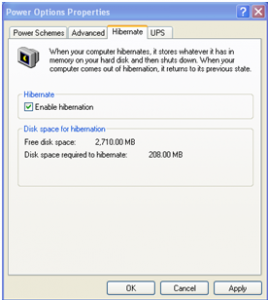
Windows Hibernate
I then accessed Internet Explorer and performed a Google search for “how to destroy a hard drive”.

Google Search “how to destroy a hard drive”
Leaving the search engine results page open in the browser, I placed the machine into hibernation mode from the menu seen below.
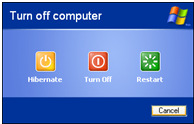
Windows Hibernate
The drive was then accessed as a secondary storage medium (plugged into another computer through a USB connection with write protection enabled) and the hiberfil.sys itself was extracted using FTK Imager on another system.

hiberfil.sys
Finally, I loaded the hiberfil.sys into a standard hex editor “HxD” and ran a string search for “how+to” to see if the URL for the Google search I performed was in fact stored in the hiberfile.sys.
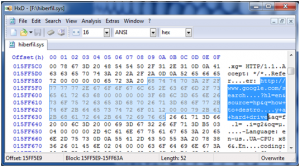
HxD hiberfil.sys
As you can see from the screenshot above, the URL for the Google search that I performed was located in the hiberfil.sys.
If you use hibernation mode you are vulnerable to this sort of attack. You may inadvertently divulge trade secrets to a malicious hacker who copies your hiberfil.sys or just as easily incriminate yourself if your computer is seized and forensically examined.
You can stop examination of this file by just not using hibernation mode. If you insist on using this feature then you should also implement full disk encryption like what you would find with TrueCrypt which is mentioned in many of the other anti-forensics articles on this website.
You will need to be aware of the fact that data can still be dumped from RAM itself after your computer has been turned off. This is possible for up to 35 seconds at normal operating temperatures. If the RAM sticks are cooled to less than 50 degrees Celsius then it is possible to perform a data dump from RAM up to hours later with some forms of RAM.
So, has anyone created any software to parse the data in the hiberfil.sys?
Yes, the Sandman Project is a library which assists in parsing data from the hiberfil.sys. I’m sure there are others and if you know of any, don’t hesitate to leave a comment. I have not personally used the library from the Sandman Project but from what I’ve read it works fairly well.
Disable Hibernation mode on Windows XP:
- Right-click empty area on desktop
- Choose “Properties”
- Select the “Screen Saver” tab
- Click “Power…”
- Select the “Hibernate” tab
- Uncheck “Enable hibernation”
Disable Hibernation mode on Windows 7:
- Open “Control Panel”
- Click “Power Options”
- Click “Change plan settings” for you current power plan
- Click “Change advanced power settings”
- Expand “Sleep”
- Expand “Hibernate after”
- Enter “0″ for “Setting:” to set hibernate to “Never”
Old Comments:
- sunday treatFebruary 3, 2010 at 5:03 pmI am waiting for the true crypt/hibernation article! I have disabled hibernation since reading this even though I don’t use it, at least I don’t think I do. Maybe when I just close the lid on my laptop it was doing this.REPLY
- Yar (Admin)February 6, 2010 at 11:43 amHey ST, it is very possible that your laptop was set to hibernate when the lid was closed. Does a hiberfil.sys file exist on the root of your system partition? Usually “C:”REPLY
- albertJuly 10, 2010 at 12:16 ammaybe a batch on desktop can resolve this problem:
###############################################################
taskkill /IM iexplore.exe /F
taskkill /IM firefox.exe /F
“C:\Program Files\TrueCrypt\TrueCrypt.exe” /dismount /quit
rundll32.exe PowrProf.dll, SetSuspendState Hibernate
###############################################################REPLY - albertJuly 10, 2010 at 12:26 amand you can add ccleaner utility:
“C:\Program Files\CCleaner\CCleaner.exe” /AUTO
ofcourse before set, at least, DOD 5220-22-M in configuration.REPLY - albertJuly 11, 2010 at 8:08 pmat last this is my best secure final batch keeping almost the same speed as the original hibernation.
powercfg at start create file hiberfil.sys and at end delete from disk when powerup from hibernation. =)
————————————————————————————–
@echo off
powercfg.exe /hibernate on
taskkill /IM iexplore.exe /F
taskkill /IM firefox.exe /F
“C:\Program Files\CCleaner\CCleaner.exe” /AUTO
“C:\Program Files\you_truecrypt_directory\TrueCrypt.exe” /dismount /quit
rundll32.exe PowrProf.dll, SetSuspendState Hibernate
powercfg.exe /hibernate offREPLY - Marc SykesNovember 27, 2010 at 6:29 amHello there.
I agree with facts that you wrote, that’s all true, but you kinda forget to mention, that the hiberfil.sys is not the only file that forensics can use to read your private data. As for example, have you known that windows is actually keeping last 120 pressed keyboard entryes (for a case of freeze, you can notice that as pressed many keys, and later they all apear at the same time, as windows process them with a delay)… And of course, we should mention the temp files which, esspecially Internet Explorer and Opera browsers are creating to use in a case if they crashes…. =)Anyway, I do have one question. As I already got a version of SandMan, I kinda can’t get any info about reading hiberfil files… I mean, is it possible that I got incomplete copy of SandMan? I can’t manage to run it…
One more thing… for what I need it, I got my Win7 x64 on intel i5 in hibernation 3 times (without shutting it down meanwhile), and last time it didn’t wake up, just simply warned me about resume error and all-alone went to normal startup. It’s home version, because it’s original with the laptop, but as I use enterprise (win7 x64 on i7 desktop pc), I know that in enterprise there’s a choice to delete hibernation file, where I simply press ctrl+alt+del and sometimes I actually can resume from hibernation, even though at first windows said it failed. So, as it went to normal startup, of course everything that was opened was ”lost in time”, or better said, locked in hiberfil.sys. So, at first, I got out the disk and make a backup copy of both hiberfil.sys and pagefile.sys, so I do have them.
As I was reading around, there is kinda no way to force windows to resume hibernation from other hiberfil.sys files, as they said, there appears kernel error a few seconds after resuming. But, I actually once DID success in resuming hibernation from old file in windows xp sp2… I tried here on win7, but when I change the new hiberfil.sys with the olderone, windows doesnt even mention anything at all at startup, it simply goes to ”Starting windows”… Is there anything I missed? I mean, I searched all over the internet, and, I must confess, your post is kinda interesting and you surely do know much about computers, so I hope that you know at least any little peace of information that I need.
Since the kernel stop and that Windows is from Microsoft, I’m sure everyone who has at least any knowledge about their software knows, that there is NO WAY that they’d make hibernation process as simple as writing everything in hiberfil.sys. There are definitly other informations changed, as bootmgr, where is written the state of pc (hibernation or shutdown etc…), and some system files. So I’m pretty sure that there’s a way of prevent kernel error because of different (but still pretty fresh (not even 1 day old file) and from the same system with same hardware and software, except for time and date, but it can be changed) hiberfil files, also, Microsoft definly has such option left for a security reasons, forensics or any…
Are you maybe having any idea, since I can’t manage to get reply from Microsoft?
Or at least, how to get files such as unsaved printscreens in paint and photoshop, opened tabs in any of browsers, opened notepads (MS Word saves its backups), Cubase (audio tool) recordings, and all similar non-autosaving contents in different programs? It’s not only (also I’d be glad to have it back, but I can live without my tabs and print screens lost… that’s all I had) for me, I want to do at least one step forward in getting information about all this.
The reason I haven’t save my opened contents is autohibernation on low battery state (which is afterall really good ability for such cases… I have similar setting on my desktop pc, where I made myself sort of cheap ups, which holds up to 2 minutes, and in a case of power blackout small circuit made of a few transistors and ne555 timers triggers via secondary usb ”keyboard” (modified only with keyboard circuit) a shortcut to batch file which sends a pc into hibernation to save data. So, even in case of some attacks and so, hibernations kinda good ability for me… =)
I’d be glad to get your reply… =)Bye, MarcREPLY - StefanJune 26, 2011 at 3:24 amHaha, if you’re so worried about forensics then you have other issues than hibernation. Pathetic.REPLY
- MaxJune 26, 2011 at 7:11 pmThat’s why we have an entire forum and author blog dedicated to all encompassing topics, kind sir.REPLY
- AlexanderJuly 23, 2011 at 5:05 amNow, Truecrypt support Hibernation file encryption.
http://www.truecrypt.org/docs/hibernation-file
But some issues with hibernation on XP. Use Win 7 and Truecrypt 7+REPLY - EMAugust 4, 2011 at 3:16 pmSome more information about HiberFil.sys: http://antiforensics.net/Computer-Forensics/hiberfil-xpress.htmlIn particular, discussing its compressed state and an EnCase EnScript for parsing it.